Manual to restore dead BootLoader
Atom, Atom Exec, Rover G5, Orsio n725, HP6815 (may be the all 68xx series).
Symptoms:
The device is not switching on, not entering bootloader.
(most often after the firmware from a memory card)
React to connect charger.
if the battery insert and connect charger, it orage led must be lit .
if the battery remove and connect charger, it orange led must be flashing.
There is only one way for restore bootloader.
Reflashing flash memory in the PXA272 using JTAG.
This procedure consists of two parts.
Hardware (making cable for reflashing) and software (reflashing).
Hardware part:
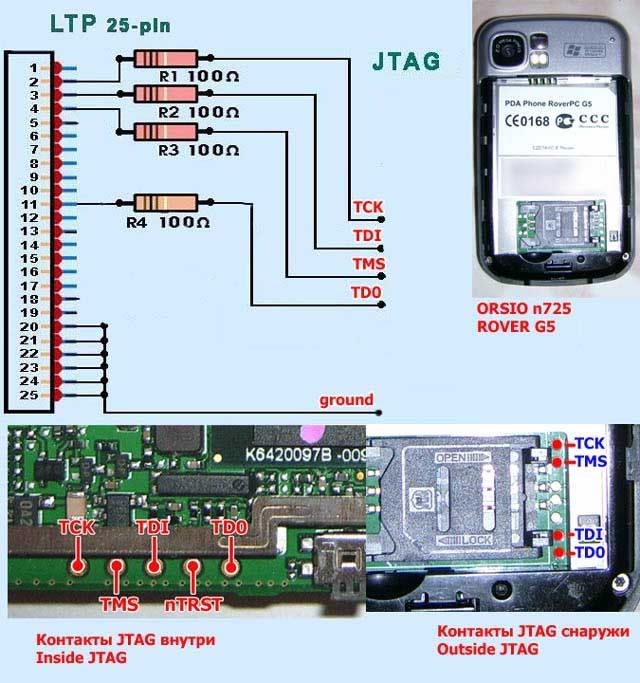
This pinouts JTAG of Atom Exec, Rover G5, Orsio n725, O2 Atom, O2 Atom Exec
At O2 Atom (not Exec) is the only internal contacts. Located near the Camera button.
There are contacts inside the device, near the buttons CAMERA,
for access them, you need to open device.
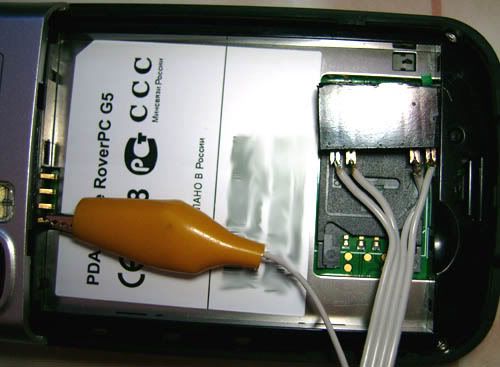
There are contacts from the outside, near the SIM connector.
All contacts is working
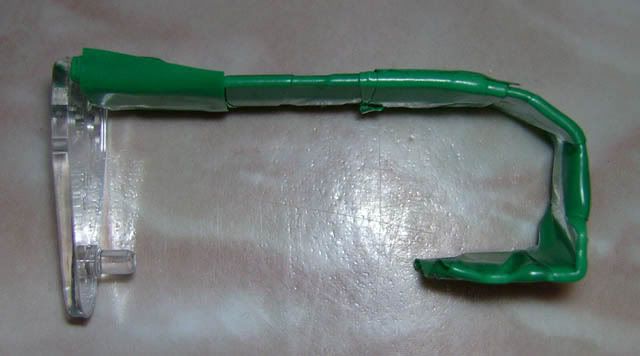
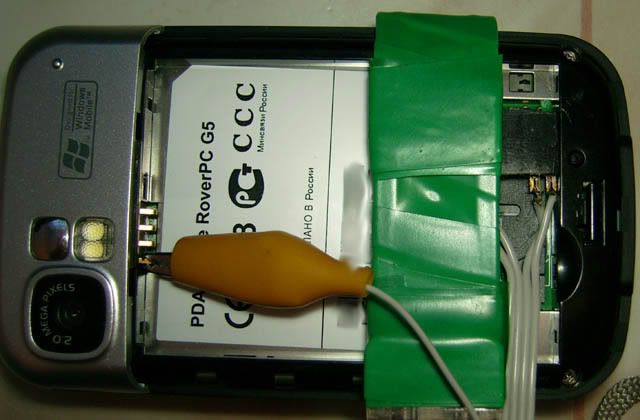
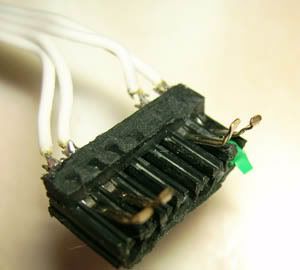
For inside contacts need this connector
You can so using connector from floppy drive 5.25”. (autor vic180)
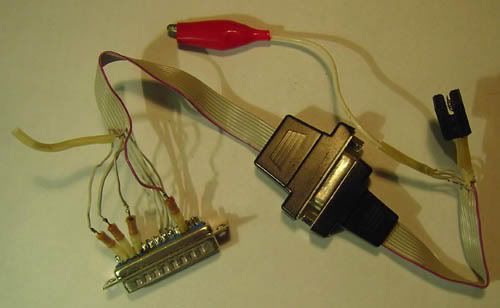
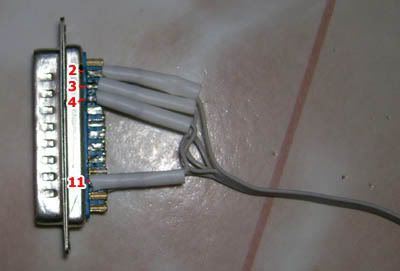
LPT connector for PC
Cable length of a 35-40 sm
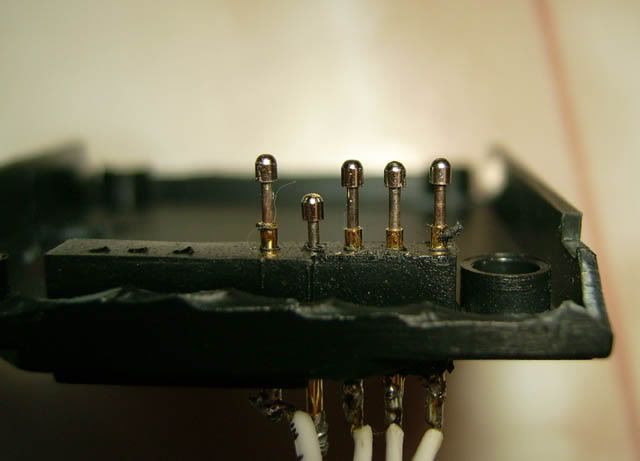
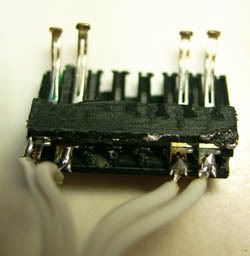
This connector for outside contacts
Result connector from connector for floppy drive 5.25"
for fixation connector need make this Or other
Software part. repairBootLoader.zip
In attached file is the programm JFlashmm,
in the same directory BOOTLOADER from АТОМ ЕХЕС (ebo_a.nb0) from First Firmware,
and driver the giveio needed for working cable.
If you have O2 Atom (not ЕХЕС), it must be in the folder jflash_mm Deleted file ebo_a.nb0,
copyng the file boot.nb0 from O2 Atom firmware in the jflash_mm folder and renaming this file in ebo_a.nb0.
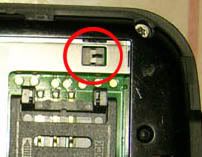
Before connecting LPT connector , you want to press and hold
micro button near to the sim connector.
For example: sticker on the button.
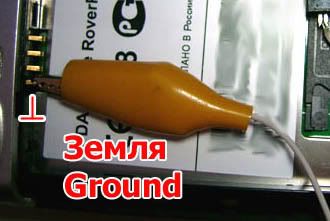
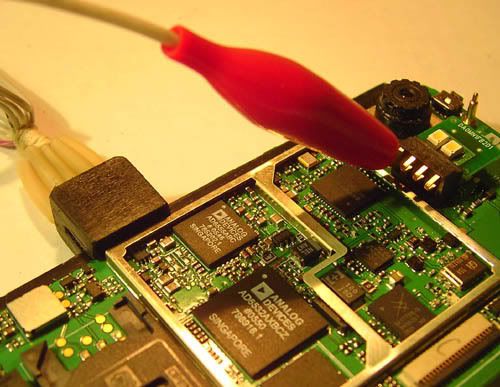
Ground from LPT connector, connecting on ground the device
(using the crocodile connector)
Connect cable to LPT port of PC.
Connect charge to the device
Orange LED is blinking.
If LED not blinking,
Check pressed the micro button.
check fixation the button.
Installing the driver giveio from attached file.
Now you can restore BootLoader.
BootLoader needs to be restored in two places.
Need boot flashing to adress 0 and address 3f400.
In folder jflash_mm there is a file start.bat.
Inside this file:
jflashmm pxa27x32 ebo_a.nb0 P 0 PAR
jflashmm pxa27x32 ebo_a.nb0 P 3F40000 PAR
So file ebo_a.nb0 (boot from атом exec) will be flashing in two places,
To adress 0 and adress 3f40000, data send to parallel port.
Execute start.bat, if all right , you correct making cable,
it must detect processor.
If message screen on "file *.DAT not find", press Soft Reset.
the program will ask you «bla-bla-bla» Y/N? Press Y
-------
JFLASH Version 5.01.007
COPYRIGHT (C) 2000 - 2003 Intel Corporation
PLATFORM SELECTION:
Processor= PXA27x
Development System= Mainstone
Data Version= 1.00.002
PXA27x revision ??
Found flash type: 28F256L18B
Unlocking block at address 0
Erasing block at address 0
Unlocking block at address 10000
Erasing block at address 10000
Unlocking block at address 20000
Erasing block at address 20000
Unlocking block at address 30000
Erasing block at address 30000
Unlocking block at address 40000
Erasing block at address 40000
Starting programming
Using BUFFER programming mode...
Writing flash at hex address 3fe80, 99.85% done
Programming done
Starting Verify
Verifying flash at hex address 3ff68, 99.94% done
Verification successful!
------------
So too for the second time in firmware to address 3f4000
You can disconnect charger and cable.
Enter bootloader :
Press Camera button, insert battery and press Soft Reset.
If everything was done correctly, it bootloader is running!!!
Now, as usual (almost)
Connect the device to PC.
Run update firmware for you device.
Must go update firmware.
If all right, it .......
Operation system update, bootloader update,
Running update ExtROM, but, it should freezes at 6 %!!!!
Disconnect usb cable from device, Enter Hard Reset!!!
Device must switch on, calibrating touch screen etc.
Run again update firmware for you device.

 Or other